Trace Temporal Workflows with Langfuse
This notebook demonstrates how to integrate Langfuse into your Temporal workflows to monitor, debug, and evaluate your AI agents and LLM-powered applications.
What is Temporal?: Temporal is a durable execution platform that guarantees the execution of your application code, even in the presence of failures. It provides reliability, scalability, and visibility into long-running workflows and distributed applications.
What is Langfuse?: Langfuse is an open-source observability platform for AI agents and LLM applications. It helps you visualize and monitor LLM calls, tool usage, cost, latency, and more.
Use Case: AI Ticket Triage with Human Approval
In this example, we build a support ticket triage pipeline that:
- Uses a Temporal workflow to orchestrate the triage steps durably
- Calls an LLM from Temporal activities to classify the ticket and draft a reply
- Waits for a human approval, delivered to the workflow as a Temporal update
- Sends all observability data to Langfuse via OpenTelemetry
The integration is built on Temporal's OpenTelemetry support (temporalio.contrib.opentelemetry) together with Langfuse's native OpenTelemetry endpoint — no Langfuse-specific SDK is required:
OpenTelemetryPluginemits spans for Temporal operations (StartWorkflow,RunWorkflow,RunActivity,HandleUpdate, ...) and propagates trace context across the client, workflow, and activity boundaries, so everything lands in a single, correctly nested Langfuse trace — even when workflows and activities run on different workers.- Replay-safe tracing: Temporal replays workflow code to recover state after worker restarts and failures. The plugin's tracer provider generates deterministic span IDs and emits each span exactly once, so replays never produce duplicate observations in Langfuse.
- LLM calls run in Temporal activities and are auto-instrumented, so Langfuse renders them as generation observations — with model, token usage, cost, and prompt/completion content — nested under the activity that made them.
This setup allows you to:
- Track workflow execution: See workflow runs, activities, and update handlers with real durations and status
- Monitor LLM calls: View prompts, completions, token usage, and costs
- Debug failures: Identify bottlenecks, retries, and errors in your pipeline
- Group and filter: Use Langfuse sessions, users, and tags to organize traces per workflow run
1. Install Dependencies
Install the Temporal SDK (with its OpenTelemetry extra), the OpenAI SDK, the OTLP exporter, and OpenTelemetry instrumentation for OpenAI:
%pip install "temporalio[opentelemetry]" openai opentelemetry-exporter-otlp-proto-http openinference-instrumentation-openai2. Configure Environment & API Keys
Set up your Langfuse, OpenAI, and Temporal credentials. You can get Langfuse keys by signing up for a free Langfuse Cloud account or by self-hosting Langfuse.
import os

# Get keys for your project from the project settings page: https://cloud.langfuse.com
os.environ.setdefault("LANGFUSE_PUBLIC_KEY", "pk-lf-...");
os.environ.setdefault("LANGFUSE_SECRET_KEY", "sk-lf-...");
os.environ.setdefault("LANGFUSE_BASE_URL", "https://cloud.langfuse.com");  # 🇪🇺 EU region
# Other Langfuse data regions include 🇺🇸 US: https://us.cloud.langfuse.com, 🇯🇵 Japan: https://jp.cloud.langfuse.com and ⚕️ HIPAA: https://hipaa.cloud.langfuse.com

# Your OpenAI key (any OpenAI-compatible endpoint also works via OPENAI_BASE_URL)
os.environ.setdefault("OPENAI_API_KEY", "sk-proj-...");

# Temporal server address (defaults to a local dev server). For Temporal
# Cloud, set TEMPORAL_ADDRESS to your Cloud gRPC endpoint, TEMPORAL_NAMESPACE
# to your Cloud namespace, and TEMPORAL_API_KEY to an API key.
os.environ.setdefault("TEMPORAL_ADDRESS", "localhost:7233");
os.environ.setdefault("TEMPORAL_NAMESPACE", "default");
TASK_QUEUE = "langfuse-tracing-task-queue"
3. Connect OpenTelemetry to Langfuse
Create a tracer provider with create_tracer_provider from the Temporal SDK and attach a standard OTLP exporter pointed at Langfuse's OpenTelemetry endpoint. Langfuse authenticates OTLP requests with Basic auth built from your project API keys.
The provider returned by create_tracer_provider is what makes tracing safe under Temporal's durable execution model: span IDs are generated deterministically from workflow state, and spans are not re-exported when Temporal replays workflow code — each logical span reaches Langfuse exactly once.
import base64

from opentelemetry import trace
from opentelemetry.exporter.otlp.proto.http.trace_exporter import OTLPSpanExporter
from opentelemetry.sdk.resources import SERVICE_NAME, Resource
from opentelemetry.sdk.trace.export import BatchSpanProcessor
from temporalio.contrib.opentelemetry import create_tracer_provider

LANGFUSE_AUTH = base64.b64encode(
    f"{os.environ['LANGFUSE_PUBLIC_KEY']}:{os.environ['LANGFUSE_SECRET_KEY']}".encode()
).decode()

exporter = OTLPSpanExporter(
    # Langfuse's OTLP endpoint is HTTP-based, so use the http exporter (not grpc).
    endpoint=f"{os.environ['LANGFUSE_BASE_URL'].rstrip('/')}/api/public/otel/v1/traces",
    headers={
        "Authorization": f"Basic {LANGFUSE_AUTH}",
        "x-langfuse-ingestion-version": "4",  # real-time ingestion
    },
)

# Replay-safe tracer provider from the Temporal SDK: deterministic span IDs,
# spans emitted exactly once even when Temporal replays workflow code.
provider = create_tracer_provider(
    resource=Resource.create({SERVICE_NAME: "ticket-triage"})
)
provider.add_span_processor(BatchSpanProcessor(exporter, schedule_delay_millis=500))
trace.set_tracer_provider(provider)
Verify that your Langfuse credentials work:
import json
import urllib.request

request = urllib.request.Request(
    f"{os.environ['LANGFUSE_BASE_URL'].rstrip('/')}/api/public/projects",
    headers={"Authorization": f"Basic {LANGFUSE_AUTH}"},
)
try:
    with urllib.request.urlopen(request, timeout=10):
        print("✅ Langfuse credentials verified!")
except Exception as exc:
    print(f"❌ Could not verify Langfuse credentials: {exc}")
✅ Langfuse credentials verified!
4. Instrument the OpenAI SDK
OpenInference's OpenAI instrumentation records every OpenAI API call as an OpenTelemetry span carrying the model name, token usage, and prompt/completion content, which Langfuse renders as a generation observation. Because the LLM calls in this example run inside Temporal activities, these spans automatically nest under the corresponding activity spans.
Any OpenTelemetry-based instrumentation works here — see the Langfuse OpenTelemetry docs for other options.
from openinference.instrumentation.openai import OpenAIInstrumentor

OpenAIInstrumentor().instrument()
5. Define the Activities
In Temporal, all I/O — including LLM calls — belongs in activities. Temporal retries activities according to a retry policy you control, and every attempt is visible in both the Temporal UI and Langfuse. Workflow code stays deterministic and is loaded by Temporal's workflow sandbox, so the workflow and its activities are defined in importable modules: in a notebook we write the files with %%writefile; in your application these are ordinary source files.
%%writefile ticket_triage_activities.py
"""Activities for the ticket triage workflow. All I/O and LLM calls live here."""

import json
import os
from dataclasses import dataclass
from typing import Optional

from openai import AsyncOpenAI
from temporalio import activity


@dataclass
class Ticket:
    ticket_id: str
    customer_email: str
    subject: str
    body: str


@dataclass
class Classification:
    category: str
    priority: str


@dataclass
class AccountInfo:
    customer_email: str
    account_name: str
    plan: str


@dataclass
class DraftReplyInput:
    ticket: Ticket
    classification: Classification
    account: AccountInfo


@dataclass
class ApprovalDecision:
    approved: bool
    reviewer: str


@dataclass
class TriageResult:
    status: str
    reply: Optional[str] = None


def _openai_client() -> AsyncOpenAI:
    # max_retries=0: Temporal's activity retry policy owns retries instead of
    # the OpenAI client, with full visibility in the Temporal UI.
    return AsyncOpenAI(max_retries=0)


def _model() -> str:
    return os.environ.get("OPENAI_MODEL", "gpt-4o-mini")


@activity.defn
async def classify_ticket(ticket: Ticket) -> Classification:
    response = await _openai_client().chat.completions.create(
        model=_model(),
        messages=[
            {
                "role": "system",
                "content": (
                    "Classify the support ticket. Respond with ONLY a JSON object like "
                    '{"category": "billing|bug|how-to|other", "priority": "low|normal|high"}.'
                ),
            },
            {"role": "user", "content": f"{ticket.subject}\n\n{ticket.body}"},
        ],
    )
    text = response.choices[0].message.content or ""
    try:
        data = json.loads(text[text.index("{") : text.rindex("}") + 1])
        return Classification(
            category=str(data.get("category", "other")),
            priority=str(data.get("priority", "normal")),
        )
    except ValueError:
        return Classification(category="other", priority="normal")


@activity.defn
async def lookup_account(customer_email: str) -> AccountInfo:
    # A non-LLM activity: appears in Langfuse as a plain span observation
    # alongside the generation observations from the LLM activities.
    return AccountInfo(
        customer_email=customer_email, account_name="Acme Corp", plan="enterprise"
    )


@activity.defn
async def draft_reply(input: DraftReplyInput) -> str:
    response = await _openai_client().chat.completions.create(
        model=_model(),
        messages=[
            {
                "role": "system",
                "content": (
                    "You are a support agent. Draft a short, friendly reply (under 120 "
                    "words) using the provided classification and account details."
                ),
            },
            {
                "role": "user",
                "content": (
                    f"Ticket: {input.ticket.subject}\n{input.ticket.body}\n\n"
                    f"Category: {input.classification.category}, "
                    f"priority: {input.classification.priority}\n"
                    f"Account: {input.account.account_name} ({input.account.plan} plan)"
                ),
            },
        ],
    )
    return response.choices[0].message.content or ""
Writing ticket_triage_activities.py
6. Define the Workflow
The workflow orchestrates the activities and then waits — durably — for a human decision, delivered as a Temporal update. Workflow code is fully deterministic and runs inside Temporal's standard workflow sandbox.
With the OpenTelemetry plugin, the regular OpenTelemetry API also works inside workflow code: the custom triage span below gets a deterministic span ID and is emitted exactly once, no matter how many times Temporal replays the workflow.
%%writefile ticket_triage_workflow.py
"""Ticket triage workflow: deterministic, sandboxed, and fully traced."""

from datetime import timedelta
from typing import Optional

from temporalio import workflow
from temporalio.common import RetryPolicy

with workflow.unsafe.imports_passed_through():
    from opentelemetry import trace

    from ticket_triage_activities import (
        ApprovalDecision,
        Classification,
        DraftReplyInput,
        Ticket,
        TriageResult,
        classify_ticket,
        draft_reply,
        lookup_account,
    )

# Bounded retries so a misconfigured LLM endpoint or API key fails fast.
LLM_RETRY_POLICY = RetryPolicy(maximum_attempts=3)


@workflow.defn
class TicketTriageWorkflow:
    def __init__(self) -> None:
        self._approval: Optional[ApprovalDecision] = None

    @workflow.run
    async def run(self, ticket: Ticket) -> TriageResult:
        # A custom span grouping the two triage steps — plain OpenTelemetry,
        # replay-safe under the plugin's tracer provider.
        with trace.get_tracer(__name__).start_as_current_span("triage"):
            classification: Classification = await workflow.execute_activity(
                classify_ticket,
                ticket,
                start_to_close_timeout=timedelta(seconds=60),
                retry_policy=LLM_RETRY_POLICY,
            )
            account = await workflow.execute_activity(
                lookup_account,
                ticket.customer_email,
                start_to_close_timeout=timedelta(seconds=10),
            )

        # Durably wait for a human decision, delivered as a Temporal update.
        await workflow.wait_condition(lambda: self._approval is not None)
        assert self._approval is not None
        if not self._approval.approved:
            return TriageResult(status="declined")

        reply = await workflow.execute_activity(
            draft_reply,
            DraftReplyInput(
                ticket=ticket, classification=classification, account=account
            ),
            start_to_close_timeout=timedelta(seconds=60),
            retry_policy=LLM_RETRY_POLICY,
        )
        return TriageResult(status="replied", reply=reply)

    @workflow.update
    async def approve(self, decision: ApprovalDecision) -> str:
        self._approval = decision
        return "approved" if decision.approved else "declined"

    @approve.validator
    def approve_validator(self, decision: ApprovalDecision) -> None:
        if decision.approved and not decision.reviewer:
            raise ValueError("approval requires a reviewer")
Writing ticket_triage_workflow.py
7. Run the Workflow
Register OpenTelemetryPlugin(add_temporal_spans=True) on the Temporal client — workers created from that client inherit it automatically. The plugin propagates trace context across every boundary and emits spans for Temporal operations, so the client, workflow, activities, and LLM calls all join one Langfuse trace. Langfuse trace-level attributes (name, session, user, tags) are set on a root span around the whole interaction; using the workflow ID as the Langfuse session ID makes it easy to find the trace for any workflow run.
Note: This requires a running Temporal server. You can start a local dev server with:
temporal server start-devIn production, the worker runs in its own process (and the starter in another); a notebook runs them side by side for convenience.
import uuid

from temporalio.client import Client
from temporalio.contrib.opentelemetry import OpenTelemetryPlugin
from temporalio.worker import Worker

from ticket_triage_activities import (
    ApprovalDecision,
    Ticket,
    classify_ticket,
    draft_reply,
    lookup_account,
)
from ticket_triage_workflow import TicketTriageWorkflow


async def main() -> None:
    # TEMPORAL_API_KEY authenticates to Temporal Cloud (TLS is enabled
    # automatically when an API key is used); leave it unset for a local
    # dev server.
    api_key = os.environ.get("TEMPORAL_API_KEY") or None
    client = await Client.connect(
        os.environ["TEMPORAL_ADDRESS"],
        namespace=os.environ["TEMPORAL_NAMESPACE"],
        api_key=api_key,
        tls=api_key is not None,
        # Emits spans for Temporal operations and propagates trace context
        # across the client, workflow, and activity boundaries.
        plugins=[OpenTelemetryPlugin(add_temporal_spans=True)],
    )

    worker = Worker(
        client,
        task_queue=TASK_QUEUE,
        workflows=[TicketTriageWorkflow],
        activities=[classify_ticket, lookup_account, draft_reply],
    )

    # A fresh workflow ID per run avoids Temporal workflow ID conflicts and
    # gives each run its own Langfuse session; the trace itself is keyed by
    # the root span opened below, which is new on every run.
    workflow_id = f"ticket-triage-{uuid.uuid4().hex[:8]}"
    ticket = Ticket(
        ticket_id="T-1001",
        customer_email="ada@acme.example",
        subject="Charged twice for the July invoice",
        body=(
            "My card statement shows two identical charges for our July invoice. "
            "Can you refund the duplicate?"
        ),
    )

    async with worker:
        # Langfuse trace-level attributes are set on the trace's root span.
        with trace.get_tracer(__name__).start_as_current_span(
            "ticket-triage",
            attributes={
                "langfuse.trace.name": "ticket-triage",
                "langfuse.session.id": workflow_id,
                "langfuse.user.id": "demo-user",
                "langfuse.trace.tags": ["temporal", "ticket-triage"],
            },
        ):
            handle = await client.start_workflow(
                TicketTriageWorkflow.run,
                ticket,
                id=workflow_id,
                task_queue=TASK_QUEUE,
            )
            print(f"Started workflow: {workflow_id}")

            # A human (here: this notebook) approves the triage via an update.
            decision = await handle.execute_update(
                TicketTriageWorkflow.approve,
                ApprovalDecision(approved=True, reviewer="demo-reviewer"),
            )
            print(f"Approval decision: {decision}")

            result = await handle.result()

    print(f"\nWorkflow status: {result.status}")
    print(f"\nDrafted reply:\n{result.reply}")

    # Flush buffered spans before a short-lived process exits.
    provider.force_flush()


await main()
Started workflow: ticket-triage-de40754e
Approval decision: approved
Workflow status: replied
Drafted reply: Subject: Re: Duplicate Charge on July Invoice
Hi there,
Thank you for bringing this to our attention! I'm sorry for the inconvenience — being charged twice is definitely not okay, and we want to get this sorted out for you right away.
I've flagged your account (Acme Corp) as high priority and our billing team is already looking into the duplicate July charge. We'll process a full refund for the extra payment within 3-5 business days.
You'll receive a confirmation email once the refund is issued. If you have any questions in the meantime, don't hesitate to reach out!
Warm regards, Support Team
8. View the Trace in Langfuse
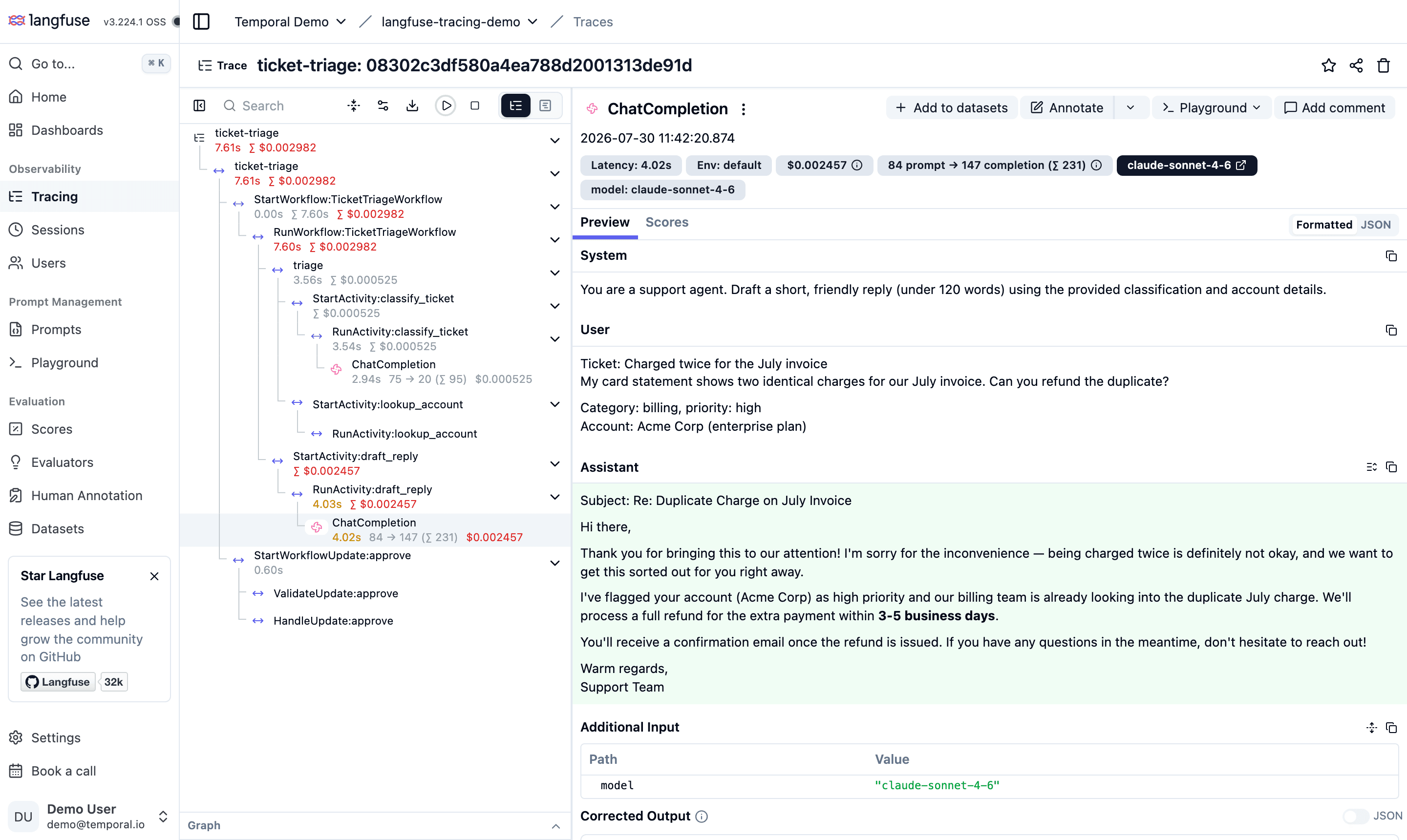
Open your Langfuse project and go to Traces — the run above appears as a single trace named ticket-triage, with the full execution tree correctly nested:
ticket-triage                                   (trace root: session, user, tags)
├── StartWorkflow:TicketTriageWorkflow          (client)
│   └── RunWorkflow:TicketTriageWorkflow        (workflow)
│       ├── triage                              (custom span from workflow code)
│       │   ├── StartActivity:classify_ticket
│       │   │   └── RunActivity:classify_ticket
│       │   │       └── ChatCompletion          (generation: model, tokens, cost)
│       │   └── StartActivity:lookup_account
│       │       └── RunActivity:lookup_account
│       └── StartActivity:draft_reply
│           └── RunActivity:draft_reply
│               └── ChatCompletion              (generation: model, tokens, cost)
└── StartWorkflowUpdate:approve                 (client)
    ├── ValidateUpdate:approve
    └── HandleUpdate:approve
What you get:
- Temporal operations as spans with real durations — workflow execution, activity executions, and the update handler (
ValidateUpdate/HandleUpdate) that carried the human approval. - LLM calls as generations with model, token usage, cost, and prompt/completion content, nested under the activity that made them.
- Cross-references to Temporal: every Temporal span carries
temporalWorkflowIDandtemporalRunIDattributes, so you can jump from any observation to the exact workflow execution in the Temporal UI. - Sessions and users: the workflow ID doubles as the Langfuse session ID, so the Sessions view groups all traces for a given workflow run, and
langfuse.user.idenables per-user filtering.
Notes on Durable Execution
- Replays are invisible in Langfuse. Temporal recovers workflow state by re-executing workflow code (on worker restarts, failovers, or cache evictions). The plugin's tracer provider assigns deterministic span IDs and suppresses re-export during replay, so a workflow that replays any number of times still produces exactly one clean trace. Trace context is carried in Temporal headers persisted in workflow history, so parenting also survives replays and worker changes.
- Flush before short-lived processes exit. The OTLP span processor batches in the background; call
provider.force_flush()at the end of starters (as above) and on worker shutdown. - Use a fresh workflow ID per run. The workflow ID doubles as the Langfuse session ID, so each run groups cleanly in the Sessions view. (The trace itself is keyed by the starter's root span, which is new on every run.)
Learn More
- Temporal OpenTelemetry integration (Python SDK API reference)
- Temporal Python samples — including a runnable
langfuse_tracingsample with a self-hosted Langfuse docker-compose setup - Langfuse OpenTelemetry docs — property mapping, supported semantic conventions, and other OTel-based instrumentations
- Temporal documentation — workflows, activities, updates, and durable execution concepts
Last edited


